The FLexlaw Workspace

One window.
The whole practice.

The Workspace is a citation‑grounded AI research platform for Florida practice — search, the citator, cite‑check, statutes, and your own notebooks on one screen. Cites are checked against the database. Quotes are matched to the underlying opinion. PDFs come out brief‑ready. Built by a Florida lawyer, for Florida lawyers.

1.1M+
Florida & related federal cases
6.25M
Discrete passages indexed for semantic search
17.8M+
Citation edges
85K+
Statute sections
Daily.
Sync from live court feeds

Find the Needle. · Follow the Thread. · Build the Brief in Minutes.

Every tool is a panel,
not another tab.

The Workspace at flexlaw.co/app puts your whole research stack on one screen. Search the law, walk the citator, check your cites, pull statutes, and work your own case files — switching panels, never losing your place. Here's how each one works.

Search Case pages Citator Cite check Statutes & rules Notebooks Paige
The Foundation

A corpus built for
Florida practice.

We didn't fine‑tune a general model on a handful of cases. We built a structured, continuously updated Florida legal database from the ground up — then layered intelligence on top of it.

Florida‑first coverage

Every Florida DCA, the Florida Supreme Court, all Florida Statutes and Rules, and administrative orders from all 20 circuits. Federal coverage spans SCOTUS, the Eleventh Circuit, and the Southern, Middle, and Northern Districts of Florida.

Daily sync

New opinions are pulled every morning from live court feeds, cleaned, summarized, embedded, and wired into the citator before you start your day — so you're always working with the latest authority, not last quarter's supplement.

AI‑enriched, lawyer‑ready

Hundreds of thousands of cases carry structured briefs — holding, facts, issue, reasoning, disposition, key quotes, and numbered headnotes — generated from the opinion text itself, not guessed. Plus topic tags, statute references, and paragraph waypoints.

The FLexlaw Reporter

Modern decisions that lack an official citation are published in FLexlaw's own reporter — a clean, citable format: 2026 FL 1, 3 (Fla. 5th DCA Jan. 2, 2026). Once assigned, the citation never changes.

📚

Clean text, verified cites

Every opinion is scrubbed of encoding artifacts, fixed for paragraph breaks and reporter spacing, then chunked with overlap for retrieval. Citations are parsed into a structured graph of 17.8M+ edges, so "cited by" links point to actual opinions in the corpus, not citations invented by a language model.

One pipeline, end‑to‑end

Fetch → clean → summarize → embed → citator → reporter → export. Owning every step means your searches, your citator badges, your exported PDFs, and your pincite headers all flow from the same authoritative source.

Every case, read the way
a lawyer reads one.

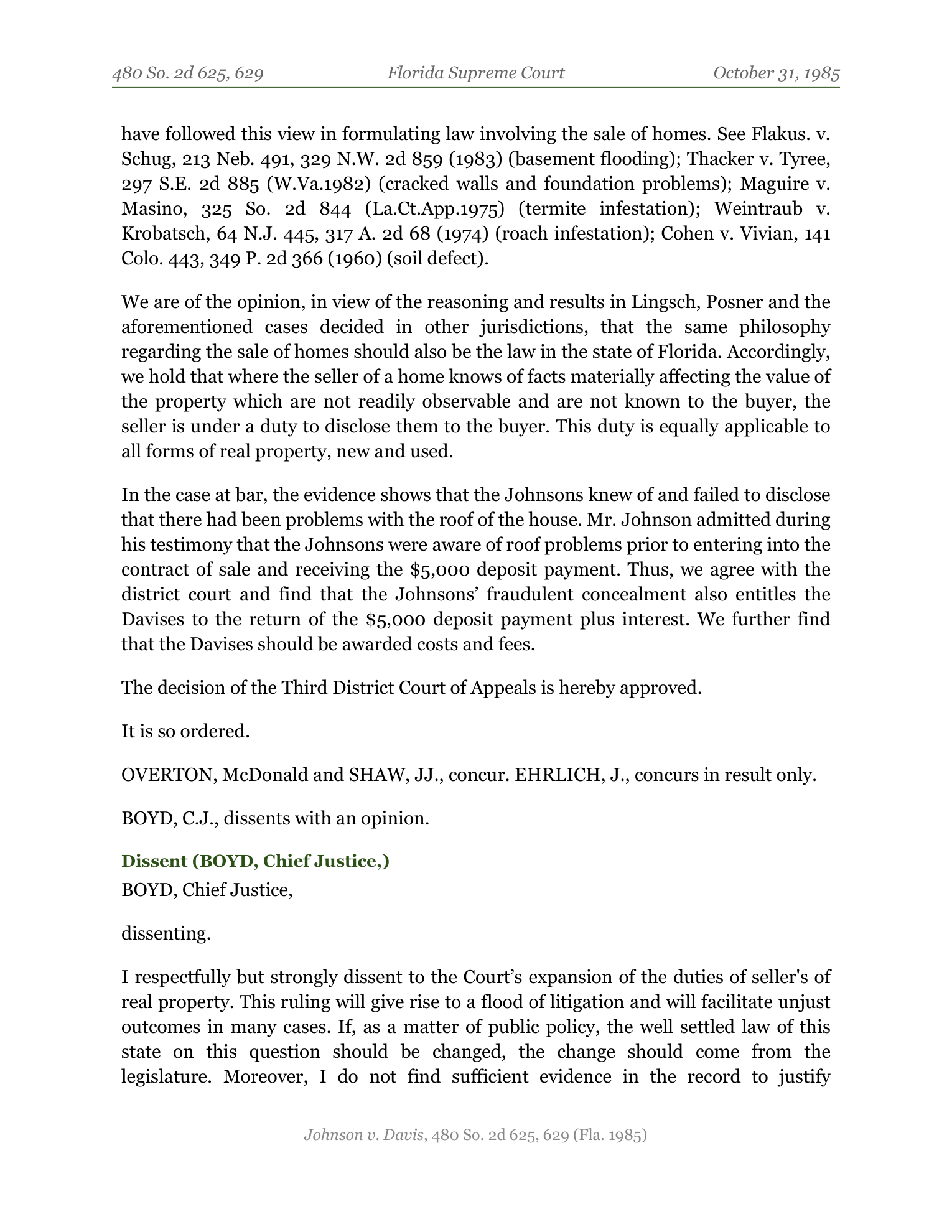
Open any case and you get a structured, scannable briefing on top of the full opinion — triage in twenty seconds what used to take twenty minutes.

flexlaw.co/case/129971/1985-johnson-v-davis-480-so-2d-625
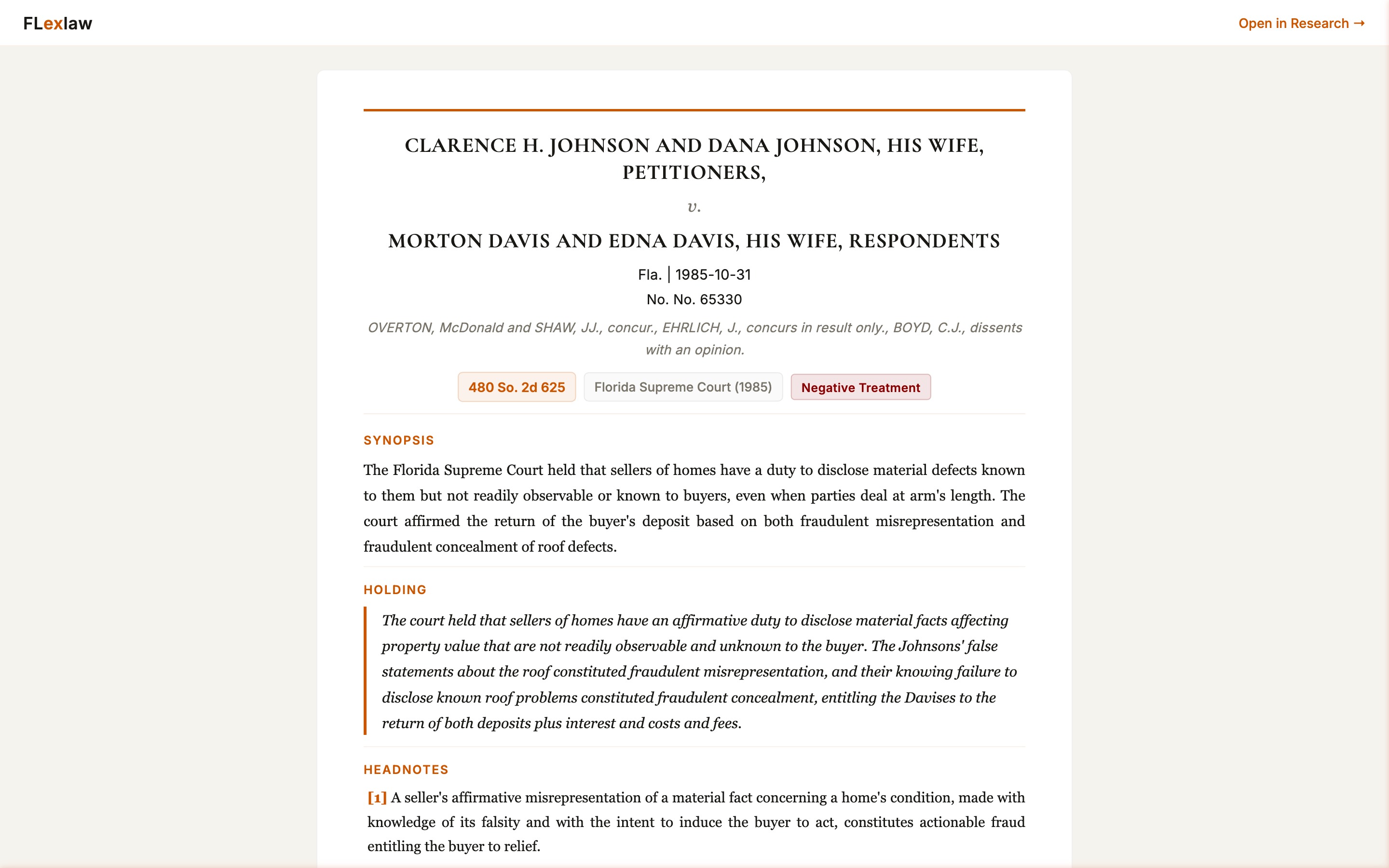
FLexlaw case page for Johnson v. Davis, showing Synopsis, Holding, and numbered Headnotes sections
Synopsis — case in one paragraph, for fast triage Holding — extracted and foregrounded above the opinion Headnotes [1]–[N] — numbered legal propositions Treatment badge — real-time citator signal Full opinion below — not behind a tab
Know the treatment
before you cite.

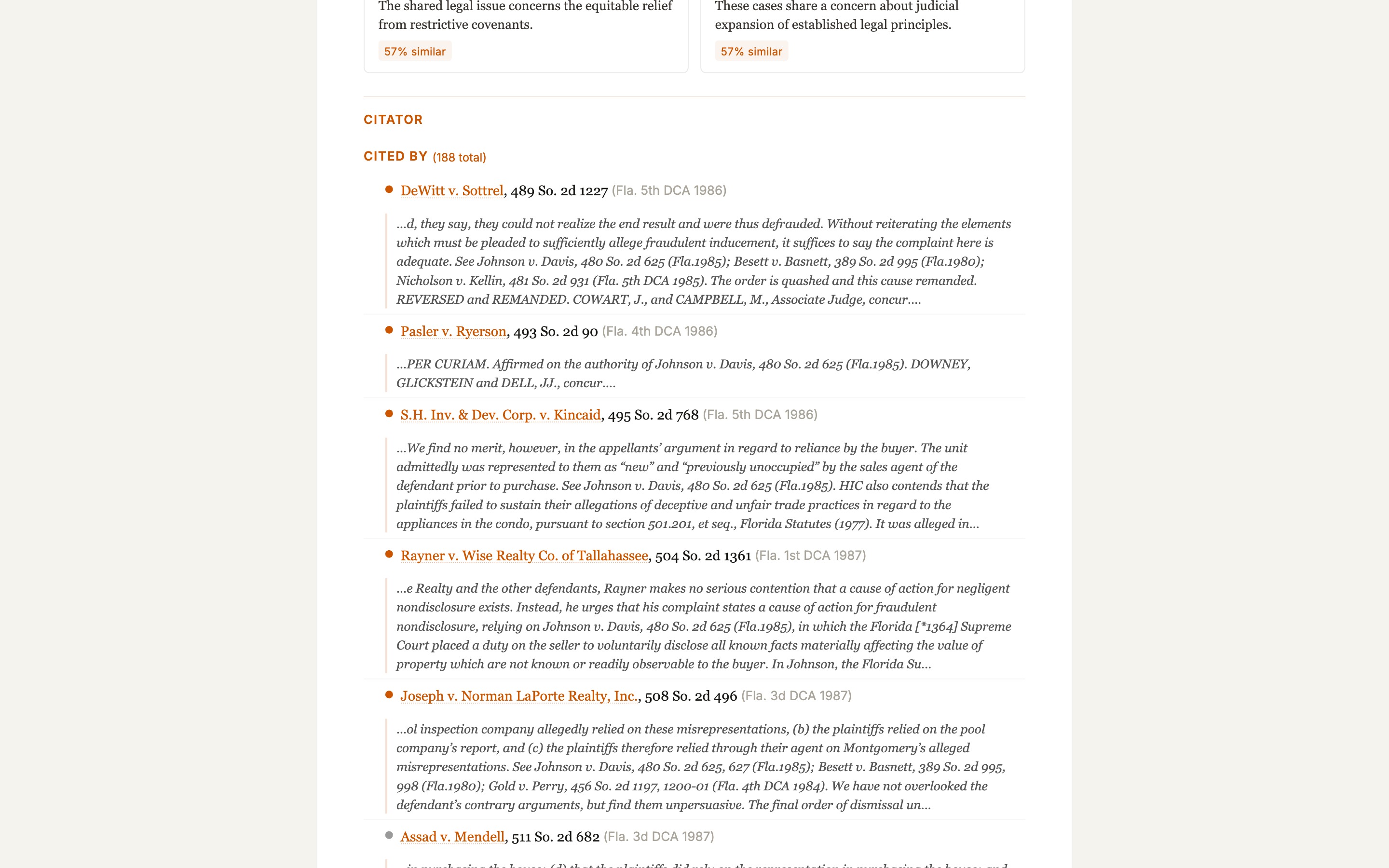
Every citing case comes with a plain‑English context window — the actual passage where the citing court invoked this case and why. No black‑box green flags.

flexlaw.co/case/129971/…#citator
FLexlaw citator block showing Cited By 188 total with per-case context windows and Authorities Cited outbound list
Negative Caution Positive treatment vocabulary

One click. One brief‑ready PDF.

Every page carries the pinpoint citation in the header and the complete citation string in the footer. The cite is done before you open your brief.

Johnson v. Davis, 480 So. 2d 625, 627 (Fla. 1985) — page 4 of 9
FLexlaw exported PDF page showing case caption, reporter topics, and full opinion text with citation in footer
Running pincite header — cite updates as the page turns Full citation string in every page footer Reporter-page transitions tracked — pincites map to the source page FLexlaw Reporter cite for modern opinions — stable day‑one

Verify every citation
before you file.

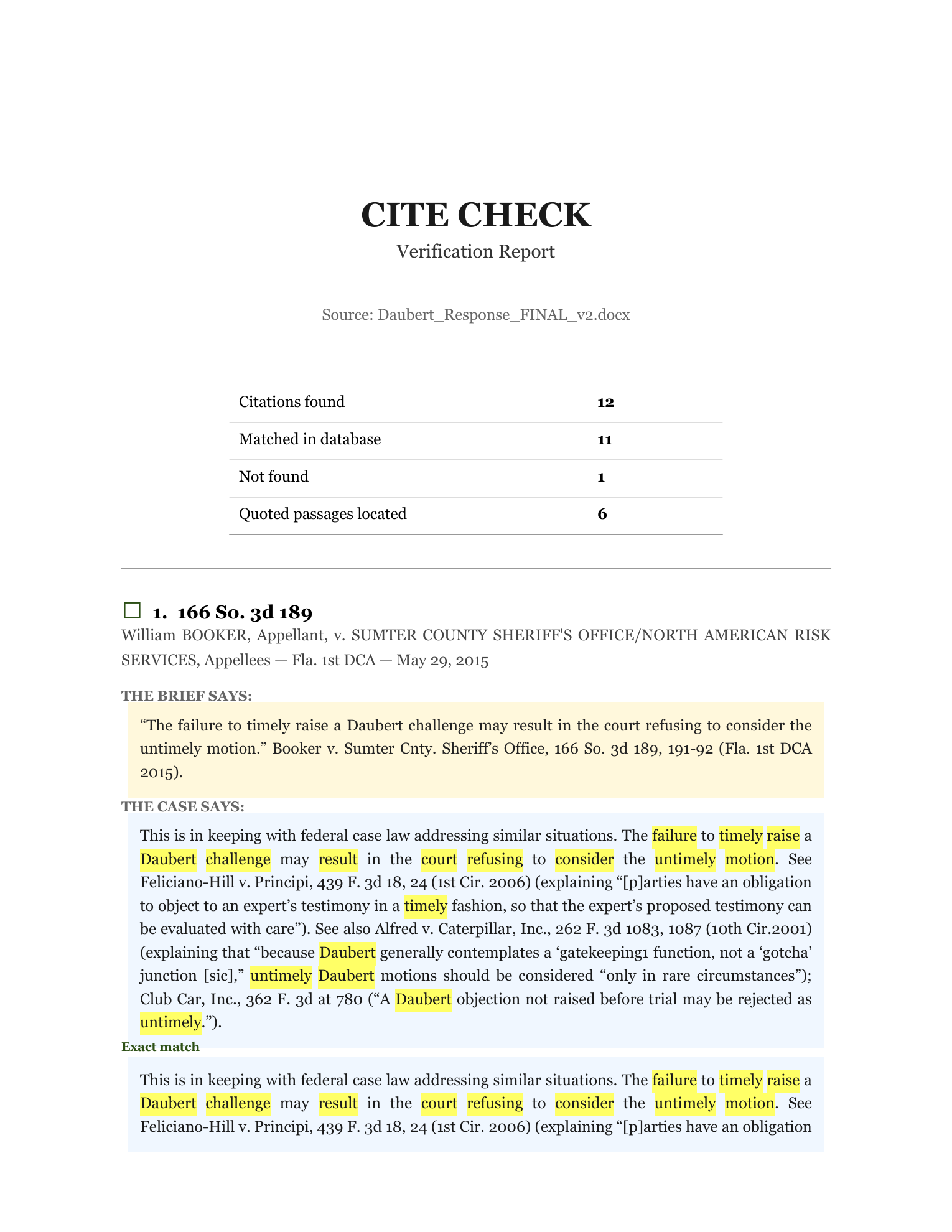
Drop a brief or motion into Cite Check and FLexlaw runs every citation against the grounded database — confirming case names, locating quoted passages in the opinion text, and generating a highlighted report.

12
citations found
11
matched in database
6
quoted passages located
~17s
end‑to‑end

Real run — Daubert_Response_FINAL_v2.docx, April 18, 2026.

Cite Check — Verification Report · Daubert_Response_FINAL_v2.docx
FLexlaw Cite Check verification report showing brief quote on top with primary source text below showing surrounding context and highlighted passages
Brief's quote on top — primary source below with surrounding context Passage-level match — not semantic approximation Principal-cite-first resolver — 509 U.S. 579 lands on Daubert Output: PDF report · merged brief · ZIP of highlighted opinions
Open Cite Check →

Your case workbench,
beside the law.

Open a notebook panel right next to your research. Upload your documents — depositions, contracts, pleadings, expert reports — pull in cases from the FLexlaw corpus, and work with everything in one AI‑powered notebook. Every response cites the specific document and page it draws from.

notebook.flexlaw.co
7 docs · 19.6K tok — token budget visible at all times + FLexlaw — pull corpus cases directly into the workbook Copy · Word · PDF — output in any format Multiple AI models — model toggle per task Context Window indicator — always know your headroom

Your A.I. Paige,
wherever you work.

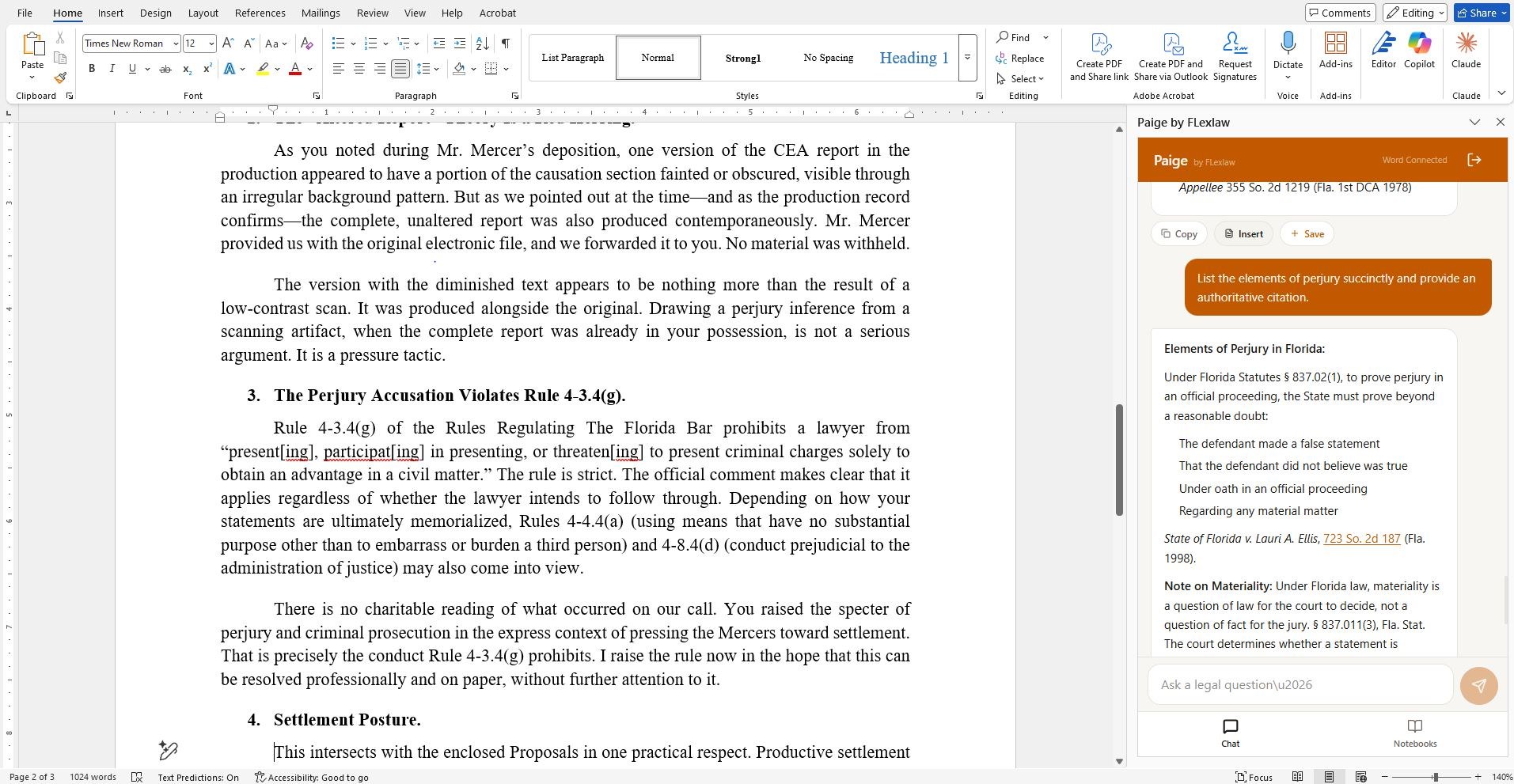
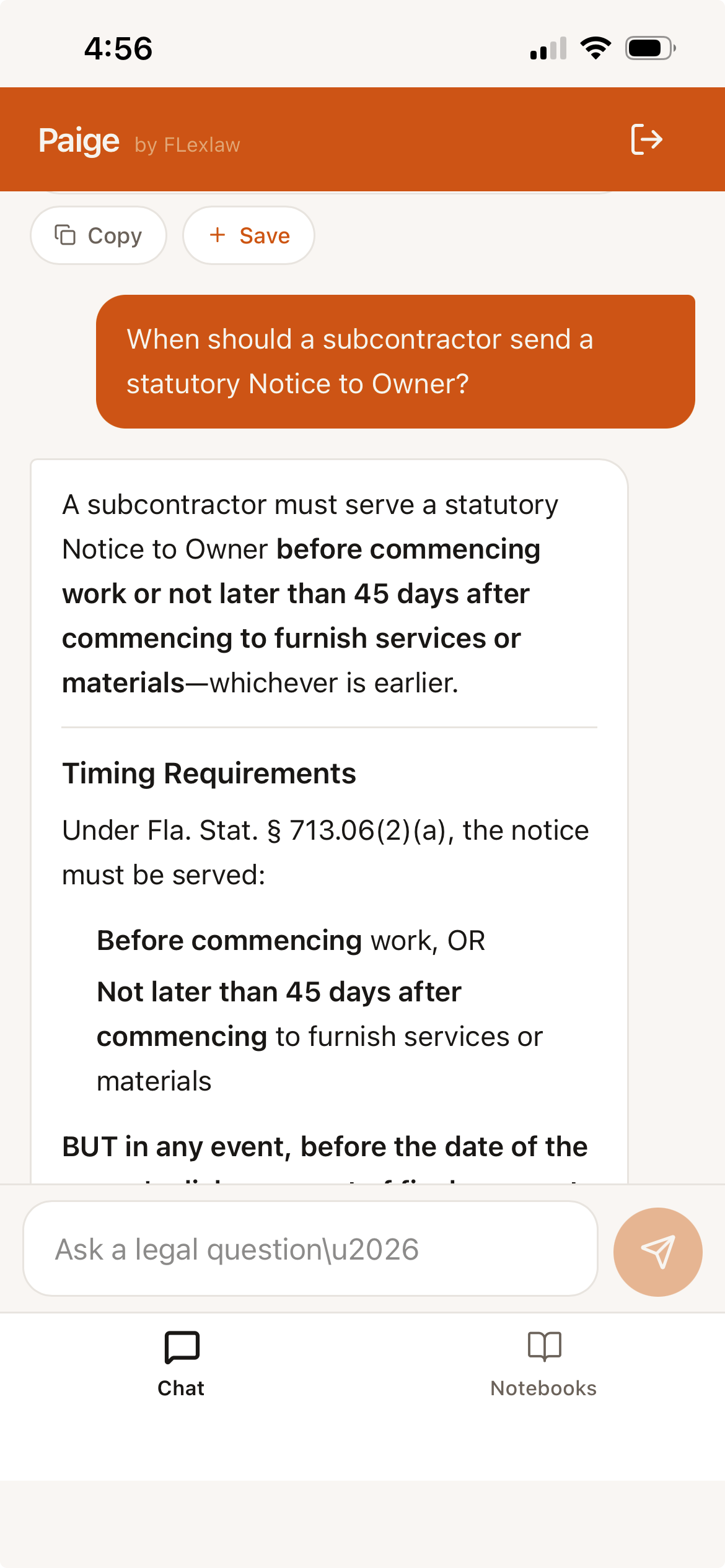
Paige lives inside Microsoft Word as a task pane and on your phone as a mobile app. Ask for a case holding, a statute section, or a structured research summary — Paige fetches it from FLexlaw's grounded database and drops it directly into your document.

Microsoft Word  ·  Paige by FLexlaw — Word Connected
Microsoft Word document open with the Paige by FLexlaw task pane on the right, showing a response listing the elements of perjury under Florida law with H.P. Gordon v. State of Florida citation
Lives inside Word — no tab switching, no copy-paste Grounded responses — same 1.1M+ corpus as the web platform Clickable citations — jump to the full opinion in one click Chat & Notebooks tabs — research or workbook, your call Same citation & quote verification gates as every FLexlaw surface
Paige mobile PWA on iPhone — chat answer explaining the 45-day timing requirement for a subcontractor Notice to Owner under Fla. Stat. § 713.06(2)(a)
Works as a PWA — add to home screen, no App Store needed Same grounded corpus — full 1.1M+ case database on mobile Chat & Notebooks — both modes available on phone
About Paige → Access →
Accuracy First

Built for Security.
Built for Accuracy.
Built for Lawyers.

Legal AI without verification safeguards is a liability. FLexlaw is engineered with multiple hard gates between the model and your filing.

Powered by Anthropic

FLexlaw runs on Anthropic’s enterprise infrastructure — the team behind Claude, and the research shop setting the standard for A.I. safety. Zero training on your data. Zero retention except as required by law. Dedicated compute.

🔒 Citation gate

Case citations are checked against the database before they appear in any output. If a citation can't be confirmed, the system flags it for your review rather than letting it pass silently.

🔎 Quote gate

Before placing text in quotation marks, the system retrieves the underlying opinion and matches the passage verbatim — dramatically reducing the risk of fabricated or reconstructed quotes.

⚠ Verify flags

When something can't be confirmed, you see it. [VERIFY CITE] or [VERIFY QUOTE]. These gates don't guarantee perfection, but they dramatically reduce error rates versus unguarded AI.

Getting the Most Out of FLexlaw

Six habits that pay off.

FLexlaw works out of the box. These are the patterns that separate good research from great research on the platform.

01

Lead with facts, not conclusions

"The seller patched drywall over a leaking pipe and never told my client" will outperform "fraudulent concealment latent defect." Describe the situation; query expansion translates it into the doctrinal vocabulary courts use.

02

Search more than once

Each phrasing activates different expansion pathways and surfaces different authority. Try the fact pattern first, then a doctrinal framing, then a statutory reference. Three searches will always beat one.

03

Check treatment before you rely

A case distinguished forty times in your context may not carry the weight you expect — even if it hasn't been overruled. The treatment badge is the first thing to look at on any case page, and it updates daily.

04

Cite Check your own work

Run your brief through Cite Check before filing. Citations are checked against the database in seconds. Good law, cautionary flags, suspected phantom cites — all surfaced at once, plus the quoted‑passage check. Then run opposing counsel's brief too.

05

Build a notebook per matter

Drop your depositions, contracts, and expert reports into FlexbookLM. Pull in the leading cases from the corpus. Ask questions across all of them at once. Upload an exemplar when you need drafting in a specific style.

06

Export the PDF, keep the pincite

When you find the case you need, export it. Each page carries its pincite in the header and the full citation in the footer. The cite string is done before you even open your brief.

Research modes built
for every kind of question.

FLexlaw organizes its intelligence into discrete research modes — each one a standalone mode in the interface and a first-class endpoint in FlexAPI, the proprietary API protocol for enterprise and research customers.

/case

Case Lookup

Direct retrieval by reporter citation, case name, or FLexlaw ID. Entry point to the full case view — brief, headnotes, citator, and export — without going through search.

/statute

Statutes

Florida Statutes by section number or keyword. Chapter overviews, subsection text, and the cases that cite each provision — so doctrine and statute stay connected.

/topics

Topic Index

Browse the corpus by legal topic. See the leading cases clustered around each proposition, and drill into any one. Good for issue surveys and building a doctrinal map before you start citing.

/court-docs

Local Rules & Court Docs

Local Rules from every Florida circuit and federal district, plus administrative orders, standing orders, and judicial preferences — searchable and current. The rules your brief lives or dies by.

SCOTUS

SCOTUS Research Module

A research-grade Supreme Court interface for academia and federal practitioners. Full opinions, the SCOTUS citation graph, and deep integration with the Florida corpus — so you can follow authority from the Supreme Court down through every Florida DCA that applied it. Purpose-built for law review research and faculty scholarship.

FlexAPI  ·  Enterprise

Every research mode is an API endpoint.

AI agents are becoming the dominant users of legal research tools — not humans browsing a UI, but pipelines, workflows, and models querying structured data programmatically. FlexAPI is built for that world. Every research mode above is exposed as a first-class endpoint returning the same grounded, citation-verified intelligence that powers the interface — optimized for machine consumption, not browser UX. Citations come from the database, not a language model's guess. Quotes are matched to source text. Programmatic access to the underlying corpus.

FlexAPI is our API for programmatic access. To inquire about API or MCP access, inquire →

GET/flex/case/:citation
GET/flex/statute/:section
GET/flex/topics/:topic
GET/flex/court-docs/:court
POST /flex/research// natural language

Ready to research
the way a lawyer thinks?

Your whole Florida practice in one window — built by a Florida lawyer, for Florida lawyers. Free for noncommercial use.

Open the Workspace → Get access
Free for noncommercial use · academic, nonprofit & public‑interest · Create an account →
Enterprise or API access? Inquire →